
tko77 APK — Download & Install on Your Android Phone Now
Not available on the Google Play Store — download directly from this page. The file is delivered from tko77's official server over an SSL-secured connection. Stay away from third-party mirrors or modified versions.
iPhone users cannot install APK files. See how to use tko77 on iPhone →
Download Package & App Details at a Glance
Before downloading, check the list below to confirm your phone's Android version is compatible and you have enough storage space. This page will be updated whenever the app receives a new update.
| Info | Details |
|---|---|
| App Name | tko77 |
| File Name | tko77.apk |
| Version | 2.7.6 |
| File Size | 36 MB |
| Last Updated | 26 November 2026 |
| Minimum Android | Android 8.0 (Oreo) |
| Price | Free |
| Language | Bengali / English |
| Download Source | tko77.live (Official) |
iPhone Users: Add a Shortcut to Your Home Screen
APK files do not run on iPhone, but you can open tko77.live in Safari and add it to your Home Screen for an experience similar to an installed app:
Open tko77.live in Safari on your iPhone (this option does not work in Chrome or Firefox).
Tap the Share button at the bottom centre, scroll down and select Add to Home Screen.
Tap Add — the tko77 icon will appear on your Home Screen.
For details on notifications, fullscreen mode, and other differences on iPhone, tko77 on iPhone: Full Guide →
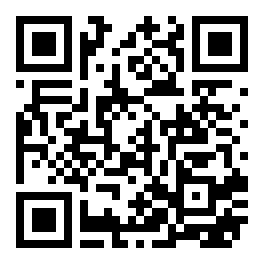
Scan with your camera to download directly
- Games load from cache — no need to reload the browser tab
- Keeps the game UI running even on a weak network
- Push notifications delivered straight to your phone
- 5,100 games — Crash, Fishing, Lottery, Slots all in one App. Browse the game list →
- bKash, Nagad, Rocket, Upay — deposit and withdraw right from the App
Steps to install the tko77 APK on Android
Follow these five steps on any Android 8.0 or higher phone and the installation will be done. The whole process takes two to three minutes at most — once you have done it, future updates follow the same path.
Allow installation from unknown sources
Go to your phone's Settings → Apps (or Application Manager) → three-dot menu at the top → Special app access → Install unknown apps → select Chrome or whichever browser you are using → turn on Allow from this source. On Samsung phones the path is slightly different: Settings → Biometrics and security → Install unknown apps. On Xiaomi or Redmi: Settings → Additional settings → Privacy → Unknown sources. You only need to do this once — no need to repeat it for future updates.
Tap the Download button
Tap the "Download APK" button on this page or the button in the download section. The download will start — a 36 MB file named tko77.apk will be saved to your phone's Downloads folder. Do not close the browser tab while the download is in progress — if it is interrupted midway the file gets corrupted and you will get a Parse error during installation. If your mobile data is slow, switching to Wi-Fi will speed things up.
Open the downloaded file
Once the download is complete, a notification will appear in your notification bar — tap it to launch the installer directly. If you miss the notification, open the Files or My Files app on your phone → Downloads folder → tap the tko77.apk file. If you do not have a file manager, you can also open it from your browser's download history (in Chrome: three dots → Downloads).
Tap the Install button
The installer screen will show the app details. Tap Install. Android Play Protect may show a warning — "App installed from unknown source" or "This app was not verified by Google Play". This is an automatic Google warning that appears for all APKs outside the Play Store. Tap "Install anyway" or "More details → Install anyway" to continue — the file is downloaded from tko77.live over an SSL connection, not from any third party.
Open the app and log in to your account
Once installation is complete, tap Open or launch tko77 from the icon on your home screen. If you already have an account, log in. If you are new, register — the entire process is completed inside the App, no separate browser needed. For detailed registration steps and required information, see the Register page →.
App not installing? Five common problems and how to fix them
The most frequent issues people run into when downloading or installing the tko77 APK are listed below. Match your problem and follow the fix — in most cases it's sorted within two minutes.
| Problem | Likely Cause | Fix |
|---|---|---|
| Installation blocked | The "Install unknown apps" permission is turned off in your browser. Android disables this by default — no APK will install unless you enable it manually. | Settings → Apps → Special app access → Install unknown apps → Chrome (or whichever browser you are using) → tap Allow. Then tap the file again to install. On Samsung devices: Settings → Biometrics and security → Install unknown apps. |
| Parse error | The download was interrupted midway, or the browser tab was closed before the file finished downloading. A cached file from an older version can also cause this error. | Delete the existing tko77.apk from your Downloads folder. Come back to this page and download again — use a Wi-Fi connection and keep the browser open until the download finishes. Wait for the download bar to complete fully before tapping the file. |
| Not installing due to low storage | There is not enough free space on your phone to download and install the 36 MB file. Android uses roughly twice the file size in temporary space during installation. | Go to Settings → Storage → Free up space and remove unwanted photos, videos, or apps. Make sure at least 70–80 MB is free, then download again. If you do not want to delete files, move them to an SD card instead. |
| App crashes immediately on opening | Android 7.1 and below are not supported. In some cases, low RAM lets background processes interfere, or there may be a cache issue. | Check via Settings → About phone → Android version — if it is below Android 8.0, use the Web Version instead. If your version is fine, restart your phone and try opening the app again. If the problem continues, uninstall the app and do a fresh install. |
| Play Protect warning or app deleted itself | Google Play Protect scans all third-party APKs and sometimes removes them automatically. This is normal behaviour for apps installed outside the Play Store. | Open the Play Store → tap your profile icon at the top → Play Protect → Settings (gear icon) → turn off "Scan apps with Play Protect". Then reinstall the tko77 APK. Note: with this setting off, be careful about installing apps from other unknown sources. |
Always download from tko77.live. Check that the browser address bar shows https:// and a padlock icon. Files from third-party APK sites or Telegram groups may contain malware.
If none of the fixes above worked or the installation keeps failing, check the tko77 App Install Problems detailed guide →. It covers device-specific issues and has 24/7 live chat support details.
Frequently asked questions about downloading and running the tko77 APK
The questions below are the most common ones about downloading and installing the tko77 APK. For login or registration questions, visit the relevant page.
Is the tko77.apk file safe — is there any virus or malware?
When a new version is out, do I need to uninstall the old one first?
Can I run two tko77 accounts on the same phone?
Does the app have all 5,100 games, or are there more on the browser?
Do I need to register to download the tko77 APK?
Can I deposit directly with bKash or Nagad from the app?
Can I download the tko77 APK from Bangladesh?
Next steps after installing the APK
Once the app is up and running, create your account and claim a 170% bonus on your first deposit (up to ৳21,500). Full bonus terms are in the tko77 Deposit Guide →.
18+ · Responsible Gaming